
As an Amazon Associate I earn from qualifying purchases and sometimes recommend products from other sellers at no extra cost you. For more details see my disclosure policy and privacy policy.
Getting a Factorio world running with friends is simple in theory. Open a save, invite people, start building. In practice, most groups run into the same handful of snags in their first week, and almost all of them come down to picking the wrong hosting setup or skipping a few habits early on.
🖥️ Direct Hosting vs a Dedicated Server: Which Do You Actually Need?
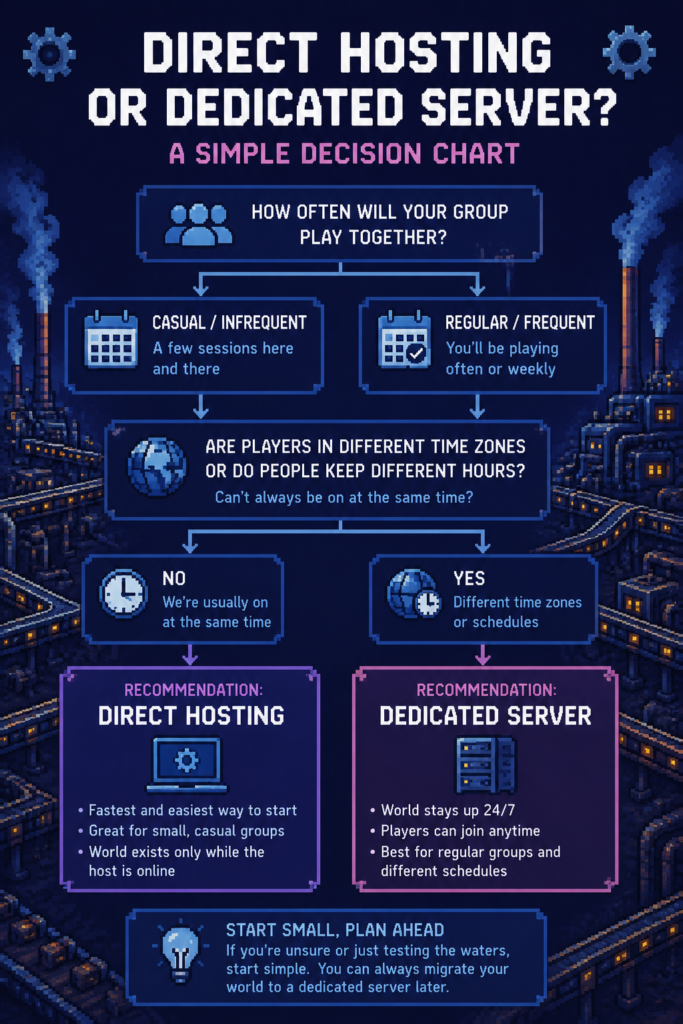
Factorio gives you two realistic ways to host a multiplayer world, and picking the right one for your group saves a lot of grief later.
Direct hosting means one player runs the game normally and opens it up for others to join. It is the fastest way to get a session going, and it works well for a small, casual group that plays together in short bursts. The catch is that the world only exists while the host’s game is open, so if they need to log off, everyone else is logged off too.
A headless dedicated server runs independently of any one player’s game session. Nobody has to “be the host” in the traditional sense, the world stays up around the clock, and players can drop in and out on their own schedule. This is the better option once a group settles into playing regularly, especially if people are in different time zones or just keep different hours.
Chill Place Gaming Store
Take your game further 🎮
Reference sheets, printable guides, and gaming goodies — made by the Chill Place Gaming team to help you play smarter.
Secure checkout
powered by Shopify
If your group is testing the water with a one-off session, direct hosting is fine. If you already know this is going to be an ongoing world with a regular cast of players, set up the dedicated server from the start. Migrating a save later is possible, but it is one more thing to manage.
⚙️ Setting Up a Headless Server Without the Networking Headache
A headless server does not need to be complicated, even if you have never run one before.
You will need a machine that can stay on for as long as you want the world available, whether that is a spare PC, a small home server, or a rented instance from a hosting provider. Factorio’s server files are lightweight, so this does not need to be powerful hardware.
Port forwarding is the one genuinely technical step, and it trips up more new hosts than anything else. Your router needs to forward Factorio’s default UDP port (34197) to the machine running the server, which usually means logging into your router’s admin page and adding a rule pointing that port at the server’s local IP address. Every router’s interface looks slightly different, so search your specific router model alongside “port forwarding” if the menus do not match what you expected.
If router settings feel like more trouble than it is worth, a paid Factorio server host removes that step entirely. You lose a small amount of control over the setup, but you gain a server that is reachable without touching your home network at all.
🧩 Syncing Mods Before Anyone Logs In
Mod mismatches are one of the most common reasons a new multiplayer world falls over in its first session.
Every player needs the exact same mods, at the exact same versions, before anyone connects. Factorio will refuse a connection if the client’s mod list does not match the server’s, and the error messages do not always make it obvious which mod or version is the culprit.
The simplest fix is to agree on a final mod list before the world is created, then have the host share their mod-list.json file with everyone else rather than each player installing mods independently from memory. It takes five minutes up front and avoids an entire session lost to troubleshooting.
💾 Save and Backup Habits Worth Building Early
A long-running factory represents real hours of work, and losing a save to a corrupted file or a bad update is worse than any in-game setback.
Factorio’s autosave settings are configurable, and the defaults are a reasonable starting point, but it is worth checking that autosave frequency matches how much progress your group would be comfortable losing. A world that only autosaves every twenty minutes can lose a meaningful chunk of a session if something goes wrong.
On top of autosaves, get into the habit of manually copying the save file somewhere separate on a regular basis, particularly before a mod update or a major game version update. This does not need to be complicated. A weekly copy to a separate folder or cloud drive is enough to protect against the worst-case scenarios.
🏭 Dividing the Factory So Builds Don’t Collide
The other common early friction point has nothing to do with technology and everything to do with four or five people building on the same map.
Agreeing on rough zones before the base gets sprawling saves a lot of “wait, who built this” conversations later. Some groups split by resource type, with one player handling smelting, another handling logistics, and another handling science production. Others split by geography, giving each player a quadrant of the map to develop as they see fit.
Whatever system you land on, write it down somewhere everyone can see it, even if that is just a shared note or a pinned message in your group chat. A base built on an unspoken agreement tends to drift as the world grows, and untangling overlapping belt lines after the fact is far more annoying than agreeing on boundaries early.
🔌 Common Early Connection Issues and How to Fix Them
A few problems show up often enough in new multiplayer worlds that it is worth knowing the fixes in advance.
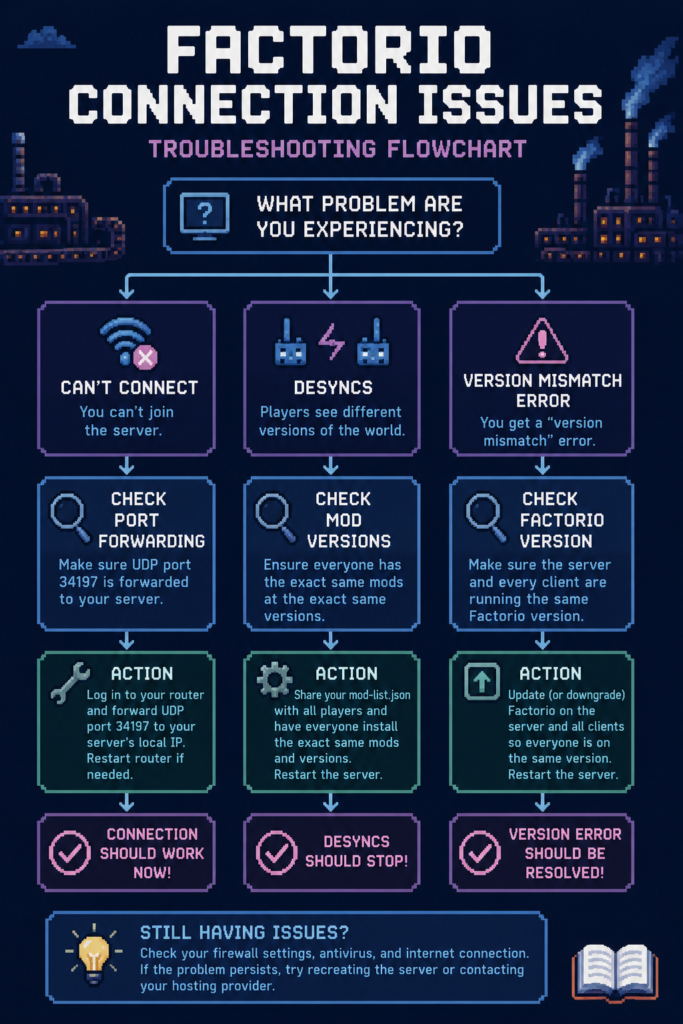
Desyncs, where players briefly see different versions of the world, usually trace back to a mod mismatch or a corrupted save file rather than anything about your connection quality. Reconnecting fixes the immediate symptom, but if desyncs keep happening, check that every player is genuinely on the same mod versions rather than just the same mod names.
A “version mismatch” error on connection means the client and server are running different Factorio versions. Factorio updates fairly often, so this tends to happen when one player’s game auto-updates ahead of the server, or vice versa. Keeping the server and every client on the same version, and agreeing as a group on when to apply updates, avoids this entirely.
If a player simply cannot connect at all, the most common cause is the port forwarding step from earlier not being set up correctly, or a firewall on the server machine blocking the connection. Double-checking both is usually faster than troubleshooting anything more exotic.
Quick Answer
For a casual, occasional session, direct hosting in Factorio is enough. For an ongoing world with a regular group, a headless dedicated server with the correct port forwarded, matched mod versions across every player, and a simple written plan for dividing the factory will save far more hours than the initial setup costs.


