
As an Amazon Associate I earn from qualifying purchases and sometimes recommend products from other sellers at no extra cost you. For more details see my disclosure policy and privacy policy.
You have built a city or two, the roads flow, the services are covered, and yet the balance keeps sliding the wrong way. Or the opposite happens: the money is fine, but demand bars sit stubbornly empty and nothing new grows. Nine times out of ten, the Taxation tab is where the answer is hiding.
Taxes in Cities: Skylines II are not one slider. They are a set of dials that decide who moves in, which companies thrive and what your city turns into. This guide walks through how the tax system actually works, how to read it, and how to set rates without guessing.
💰 How Tax Is Actually Collected
Each zone type has its own tax, and the game collects it from a different source. Residential tax comes from citizens’ wages, so it scales with how much your population earns. Commercial, industrial and office tax comes from company profit, not turnover.
That second point matters more than it sounds. A company that sells plenty but barely scrapes a profit pays very little, however high you push the rate. If a zone pays almost nothing, the problem is usually the business behind it, not the slider.
Chill Place Gaming Store
Take your game further 🎮
Reference sheets, printable guides, and gaming goodies — made by the Chill Place Gaming team to help you play smarter.
Secure checkout
powered by Shopify
Every tax slider runs from -10% to 30%. Taxation unlocks at Milestone 2, so you will not see any of this on a brand new save.
The overall rate for each zone type is just the headline. Expand the menu and you can set separate rates underneath it:
- Residential splits by education level
- Commercial, industrial and office split by product
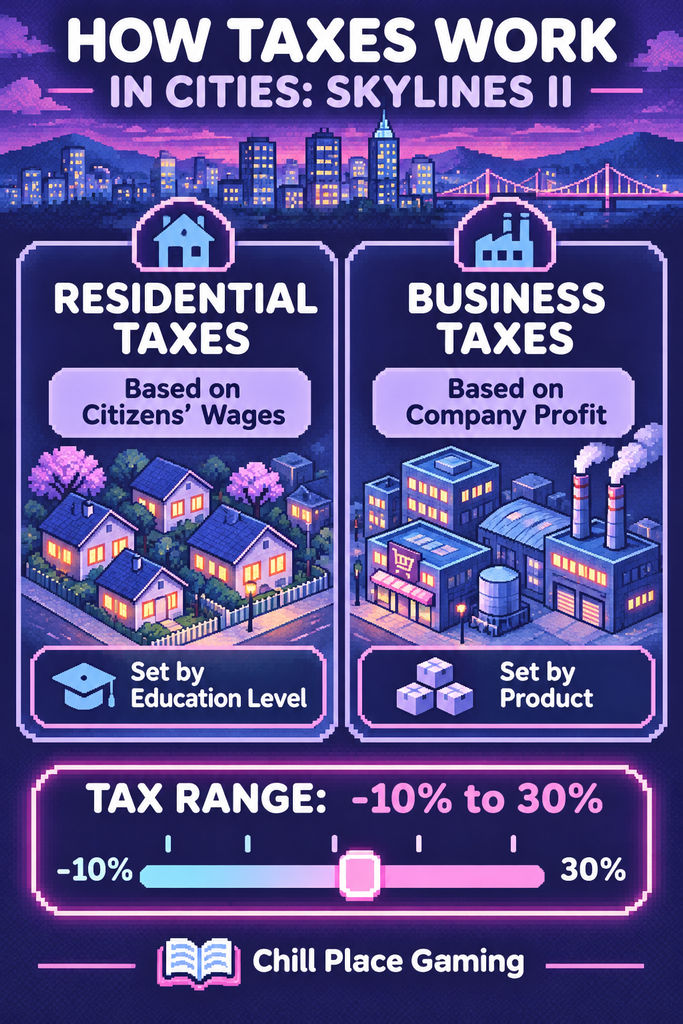
Most players leave these on the overall slider forever. That is a missed opportunity, because the split rates are where the steering happens.
Tax rates are only one part of keeping your industrial economy healthy. The way you organise production, manage resources and reduce imports can also affect your city’s finances. Our Cities: Skylines II industry areas guide explains how to build more efficient production chains and make better use of your local resources.
🏠 Residential Tax: Set by Education Level
Residential tax is set by education level, not by how rich a household is. You get a separate rate for each education tier, which lets you treat an uneducated worker and a university graduate differently.
Lower taxes do two things for residential zones. They help buildings level up faster, and they raise demand for new housing. Higher taxes bring in more money but cool both of those down.
Tax levels also feed into citizen happiness, with lower taxes pushing it up and higher taxes pulling it down. Since patch 1.6.2f1, the game bases citizen happiness, shopping and leisure choices on income rather than accumulated wealth. In practice, a household that earns well feels the pinch of a high rate sooner than a stockpile of savings would suggest.
So how do you use the education split? Think about who your city needs:
- Short on skilled workers: trim the rate for higher education levels so educated citizens find your city more attractive.
- Drowning in unemployed low-education citizens: do not cut their rate to attract more of them. Fix jobs and education first, using the Campus Expansion and Education Building Guide.
- Short on cash and stable on demand: nudge up the rate for the education tier that earns the most, a point or two at a time.
Residential is also the most sensitive of the four zone types. Push it too far and you stall growth rather than just lose happiness. If you want the wider picture of how land value and happiness feed growth, the land value guide pairs well with this section.
🏭 Commercial, Industrial and Office: Set by Product
Non-residential tax is set per product. Every resource your companies make or sell has its own rate, so you can tax grain differently from electronics or software.
This is the real steering wheel in the tax system. Lower the rate on a product and companies producing it become more profitable, which draws more of them. Raise it and you collect more per company, but you risk pushing them out.
The Production panel tells you where to push. Its logic is simple:
- Surplus: the city makes more of a product than it uses, so a higher rate costs you little.
- Shortage: the city is short of a product, so a lower rate helps companies fill the gap.
- Balanced: leave it alone and watch.
Keep in mind that a shortage of one product often ripples through a chain. If you are not sure why a shortage exists, the supply chains guide explains how production, storage and transport connect. Industry areas have their own quirks too, which the industry areas guide covers.
One tip from the player community is to tax final products more than the raw inputs companies buy. The idea is to keep the input side cheap so production stays high. Treat it as a sensible starting point rather than a rule, because your own supply chain decides whether it holds.
➖ Negative Taxes: Subsidies You Choose
Drag a slider below zero and the tax becomes a subsidy. The city pays the companies in that category instead of collecting from them. The official description frames negative taxes as a way to encourage specific production and specialise your city.
That makes them a tool, not a trick. Use one when:
- A supply chain is missing a link, and you want companies that fill the gap to appear
- You are starting a specialised industry that cannot yet turn a profit
- A product shortage is holding back everything downstream
Every point below zero costs the budget directly, so decide in advance what success looks like. When the shortage clears, or the new industry turns a healthy profit, bring the rate back up. Leaving a subsidy running after it has done its job just drains money for no reason.
Keep the scale in proportion as well. A small negative rate on one product is a targeted nudge. Dropping several categories below zero at once is a budget problem waiting to happen, and the Budgeting 101 guide shows how to catch that early.
📊 Starting Points by City Stage
There is no single best tax rate, and anyone who gives you one is guessing. Your demand, your industries and your budget all differ. What follows are starting points, to be adjusted a couple of points at a time while you watch demand and income.
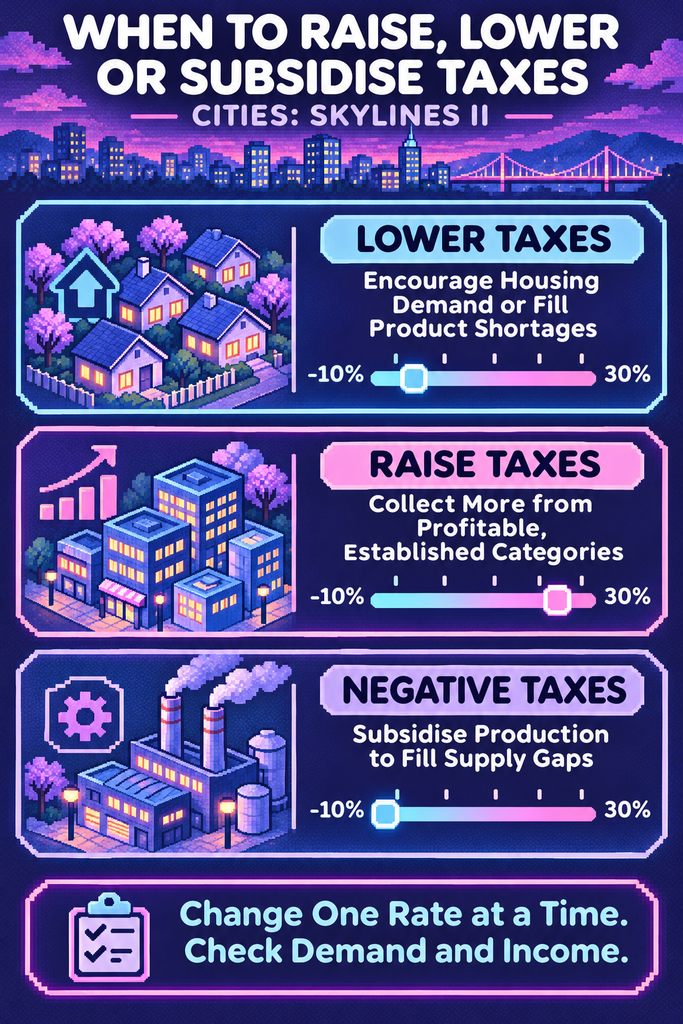
Early city
- Keep residential on the low side so housing demand and levelling are not held back
- Tax raw-material industries more freely than residential
- Do not expect much from commercial yet, because new shops rarely turn a big profit
Mid city
- Start using the split rates, trimming education tiers you are short of
- Lower rates on products in shortage, raise them on surplus
- Review any subsidies you started earlier and end the ones that have worked
Late city
- Your income should come from a broad base of profitable companies, so small increases go a long way
- Keep an eye on the products that drive your exports
- Raise rates gradually and check demand after every change
Change one thing at a time. If you move five sliders at once and income drops, you will not know which one did it.
🔍 Reading Your Estimated Tax Income
The Taxation tab shows estimated income by zone type, and by product or education level underneath. Use it as a before and after check. Note the figure, change one rate, wait a few in-game days, and compare.
Do not judge a change instantly. Demand, rents and company profits take time to respond. Give each tweak a fair run before you decide it worked.
Estimated income is also the quickest way to spot a dead category. Spend a minute scanning for any zone type or product sitting at or near zero.
🛠️ Troubleshooting Zero Commercial or Industrial Tax
If a category pays nothing despite a sensible rate, look at the company, not the slider. Tax comes from profit, and no profit means no tax. The usual causes are:
- Missing goods or raw materials: companies cannot produce or sell without inputs
- No customers: shops with nobody nearby, or poor road access, sell nothing
- Wrong rate for a young industry: a brand new specialised industry may need a lower or negative rate until it finds its feet
Patch 1.6.0f1 lowered commercial demand slightly to discourage over-zoning, and also let office goods come from outside connections when local supply falls short. If you built a lot of commercial zones under older advice, check that each one is actually profitable before you add more.
One community tip for stubborn categories is to drop the rate to a low figure, watch what happens, and raise it in small steps. A small return beats no return. Look for the point where the category stops growing, and stay just below it.
✅ What Has Changed Recently
Tax rules are stable. The ranges, the education split for residential and the per-product split for commercial, industrial and office have all held steady. The official notes for patches 1.6.0f1 through 1.6.4f1 list no direct tax changes, so older advice on the core mechanics still stands.
What has moved is the world around taxes. Patch 1.6.2f1 shifted happiness, shopping and leisure decisions to income instead of wealth, and made residential demand take city size into account. The Summer Solstice patch breakdown covers the 1.6.0f1 changes in more detail.
Be wary of advice that predates Economy 2.0. Automatic government subsidies were largely removed, so you cannot lean on them to cover a gap.
🎯 Final Thoughts
Taxes are a steering tool as much as an income source. Lower rates grow what you want, higher rates harvest what you have, and negative rates buy something specific that the market will not yet provide.
Start from the Taxation tab, change a little at a time, and let demand and estimated income tell you whether you are right. Do that, and the money stops being a mystery.
🧭 Continue Your Journey
- Budgeting 101: how to avoid bankruptcy
- Mastering taxes, subsidies and income
- How industry areas work
- Supply chains explained
- Increasing land value and population
Stop Fighting Traffic.
Start Designing It.
Get the CS2 Road & Junction Toolkit, 11 decision tools for diagnosing jams, picking the right junction, and fixing your city's traffic for good.
- ✓Road hierarchy rules and the 5 mistakes that break them
- ✓A junction selection cheat sheet and a diagnostic flowchart
- ✓A full worked example, before and after

