
As an Amazon Associate I earn from qualifying purchases and sometimes recommend products from other sellers at no extra cost you. For more details see my disclosure policy and privacy policy.
You start with a handful of logs, a tiny plot of land and a shop counter that nobody is queuing at. An hour later you are watching planks slide along a conveyor belt and wondering how a cosy potion shop turned into a logistics puzzle.
That slow, satisfying slide from shopkeeper to factory manager is exactly what makes Alchemy Factory so easy to sink an evening into. It is also what makes the first few hours confusing if nobody tells you what matters.
This guide is the hub for everything we cover on the game. It walks you through the first hours at a calm pace, explains the money system that trips up most newcomers, and points you to the right next step once your first production line is running.
🧪 What Alchemy Factory Actually Is
Alchemy Factory is a medieval-themed automation game from the three-person studio D5 Copperhead, published by Gamirror Games. You run a small shop, then build production lines with conveyor belts, pipes and a handful of magical devices to keep its shelves full. It is a Windows game, and it supports single-player as well as online and LAN co-op.
Chill Place Gaming Store
Take your game further 🎮
Reference sheets, printable guides, and gaming goodies — made by the Chill Place Gaming team to help you play smarter.
Secure checkout
powered by Shopify
It launched into Early Access on Steam on 11 December 2025. Version 1.0 followed in September 2026, when the game left Early Access, according to the developer’s Steam announcement. At the time of publishing, it was at v1.1.5023. That matters for you, because some older guides and videos describe systems that have since changed.
The shop is the economy. Everything you build exists to turn raw materials into things customers want to buy, and the coins they hand over are what pay for your next unlock.
That loop is the whole game in one sentence. Make things, sell things, spend the coins on better ways to make things.
The pace is the main difference from the better-known factory games. Nothing attacks you, nothing runs out a clock, and you can leave a half-finished build overnight without penalty. The challenge is working out what to automate next, not surviving long enough to do it.
🎮 Who This Game Suits
If you enjoy factory-builders, you will recognise the satisfaction straight away. Ratios, throughput and tidy belt layouts all matter here, but the footprint stays small and the pressure stays low.
It also suits players who bounced off bigger automation games because the scale felt like homework. Alchemy Factory asks you to run one compact workshop well rather than sprawl across a map.
Store-sim fans will find a familiar loop of stocking shelves, watching customers and chasing better margins. The difference is that you eventually stop stocking by hand and build the machinery that does it for you.
It may be less suitable if you want combat, a story-driven campaign or a game that tests your reflexes. This is a planning game, and most of the fun comes from fixing your own bottlenecks.
🪙 How the Economy Works
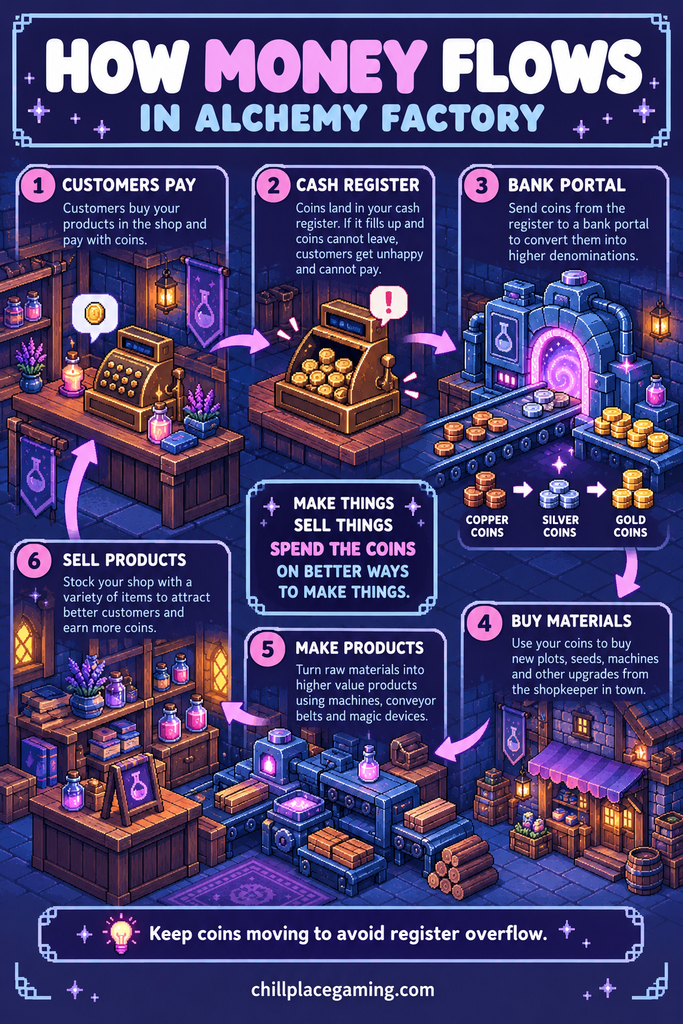
Money is not an abstract number in the corner of the screen. Coins are physical items that move through your base, and they can clog a belt just as easily as planks can.
When a customer pays, the coins land in your cash register. If that register fills up and nothing takes the coins away, customers cannot pay and leave unhappy. One community guide flags register overflow as one of the most common early problems.
The fix arrives with the Automatic Cashier, which sends coins out of the counter on a belt instead of letting them pile up. You unlock it by completing the quest to deliver 100 Healing Potions, so treat that quest as your first big goal.
Bank portals and coin sizes
Once coins are on a belt, a bank portal lets you compress them into larger denominations. In short, many copper coins become fewer silver coins, and later silver can be converted into gold. That keeps your money belts from filling up with thousands of tiny pieces.
You will see different conversion ratios quoted online. One guide gives a 50 to 1 ratio for copper to silver, while a wiki lists a different relationship between copper, silver and gold. Because the game has been through a major update, treat any number you read as provisional and check the in-game tooltip before you build around it.
Place the bank portal as close to the register as you sensibly can. The less belt there is between the two, the less room there is for coins to back up.
Where your income comes from
Early on, nearly all of your income comes from the shop. Higher shop standing brings richer customers, so keep a spread of products on the shelves rather than one item in bulk.
In version 1.0, the older reputation meter was replaced by Shop Recognition licences, which you buy from the shopkeeper in town. If a product refuses to sell, check whether you need a licence before you blame your production line.
Quests are the second stream. Check the mailbox every day, because it is where many of the better early payouts turn up. One guide reports that quest contracts can pay well above normal market value, so they are worth filling when the item is already in your stockroom.
Supply portals are the third stream. They let you send surplus production out of your base, which is handy for turning excess into coins without stocking shelves. The margins are lower than shop sales, so think of them as a pressure valve rather than a main income.
🧭 The Mindset for Your First Hours
Build messy, then tidy later. Your first layout will be wrong, and that is fine, because you do not yet know which products you will make in bulk.
Unlock one thing at a time and stock it properly before you unlock the next. Research opens with the Z key, and the temptation is to grab everything on offer. Unlocking many products at once spreads your production thin, and customers who cannot find what they want go away disappointed.
Put income first. Early coins buy the plots, seeds and machines that every later step depends on, so a slightly ugly line that sells reliably beats a beautiful one that does not.
Finally, find the slowest stage before you add anything. A practical wiki guide suggests checking five things before placing another machine: the inputs, the previous machine’s output, the transport route, the destination’s capacity and the output path. That one habit solves most early frustration.
⚙️ The Core Automation Loop
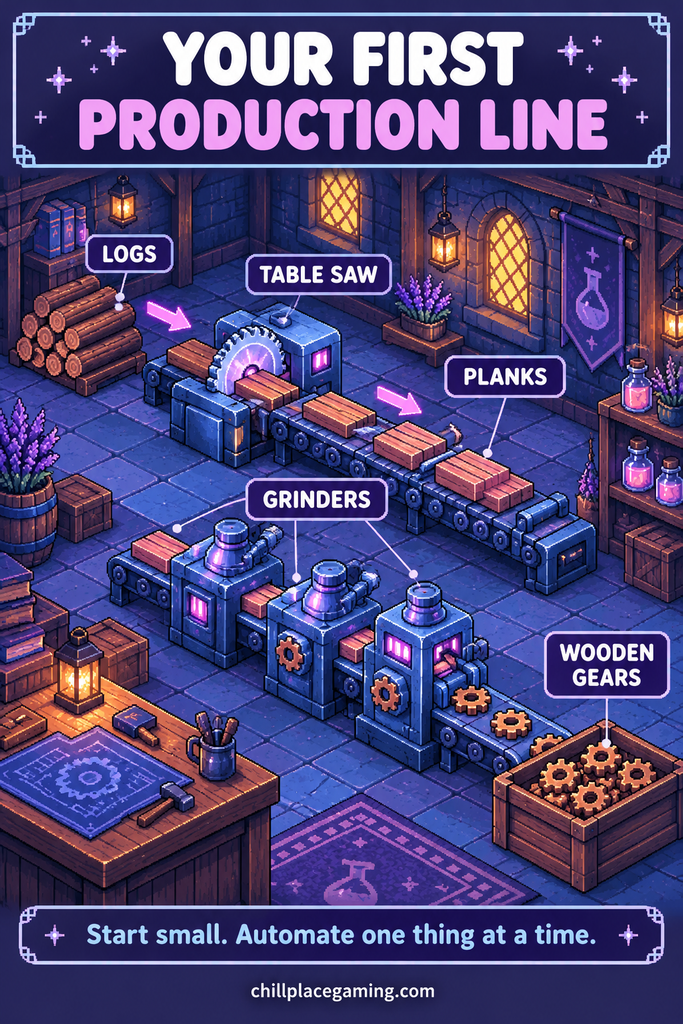
Every production line in Alchemy Factory is built from the same few parts. Raw materials come in, machines process them, belts carry the results, and something takes the finished goods away.
Machines and ratios
Your first real machine is the table saw, which turns logs into planks at roughly 30 planks a minute. Grinders and other processors then turn those planks into parts such as wooden gears, and the early quest chain teaches you the ratio between them. In the opening quests, one guide describes needing around three grinders for each saw.
The game does not warn you when ratios are mismatched. Check the production rate in the build menu before you place a machine, and watch for machines that sit idle, because an idle machine usually points to a starved input.
Quest text and turn-in requirements can also disagree. One guide notes that an early gear quest asks for a different amount than the quest text suggests, so read the turn-in screen before you panic about missing items.
Belts
Belts move your materials, and they are where most beginner builds go wrong. A common setup uses separate belts for money, fuel and, later, fertiliser, so each floor of your base has the same three lanes available.
A money belt feeds your purchase portals, so you can buy materials without walking to the merchant. A fuel belt feeds your furnaces. A fertiliser belt keeps your nurseries productive once you unlock them.
If you want a refresher on why belts and ratios behave the way they do, our Factorio automation basics guide covers the theory in more depth than we will here.
Portals
Purchase and dispatch portals do the long-distance work. Purchase portals bring materials to you, and dispatch portals send finished goods out. Placing a supply portal behind a machine lets it feed itself, which saves you building a belt from a distant source.
Fuel
Furnaces burn fuel, and the early game is much kinder if you use cheap planks rather than anything fancy. One guide advises skipping charcoal early, because the heat you gain barely covers the fuel it costs to make.
The mistake to avoid is loading a furnace before you are ready to smelt. Furnaces burn fuel continuously once loaded, even with nothing inside them, so wait until your ore supply is in place.
🌱 Your First-Hour Roadmap
The exact order depends on your build and the current patch, but the early quest ladder gives you a dependable path. Treat the steps below as a rough route, not a script.
Here is the order most guides follow:
- Buy your first logs and the starter plot, then research and place the table saw.
- Research grinders and the conveyor belt, and automate your first wooden parts.
- Complete the early gear quest to unlock the next research tier, including flax seeds.
- Plant flax, then build the chain that turns it into thread and rope.
- Make your first healing potions by pairing flax and sage production with assemblers.
- Hit the 100 Healing Potions milestone to unlock the Automatic Cashier.
Plant more flax than you think you need
Flax feeds both your rope and your potions, and demand outruns supply faster than you expect. One guide suggests planting at least eight to ten flax plots early, though a smaller number will get you started.
You can look at a plant to see how long it takes to mature. Use that to judge how many plots you need to keep a processing line running without gaps.
Visit the workbench
Version 1.0 added a workbench that sits next to your bed. One guide lists the cost as 50 planks, and says its upgrades include more inventory, gloves for faster restocking, the building tool and a potion belt that shortens the sleep timer. Prices and unlocks may shift between patches, so check what it offers in your own game.
Sleep, mail and rhythm
Your day has a rhythm of production, shop service, sleep and mail. Build a habit of checking the mailbox when you wake, restocking the shop, then spending the rest of your time on the next unlock. It keeps you from drifting between half-finished jobs.
🛒 Running the Shop Without Losing Your Mind
The shop is where your factory proves its worth, so it deserves a little routine of its own. Customers shop from everything you have unlocked so far, which means a thin shelf costs you sales.
Keep every shelf type stocked with something, even if it is a modest amount. A guide we checked notes that higher shop standing brings richer customers, and a shop that always has what people want is the quickest way to earn it.
Restocking by hand is fine for the first few days. It teaches you what sells, how fast it sells and which product runs out first.
Once that pattern is clear, automate the restock. Catapults can launch finished products onto shelves automatically, which frees you to spend your time on the next unlock instead of walking back and forth.
⏱️ A Sample First Session
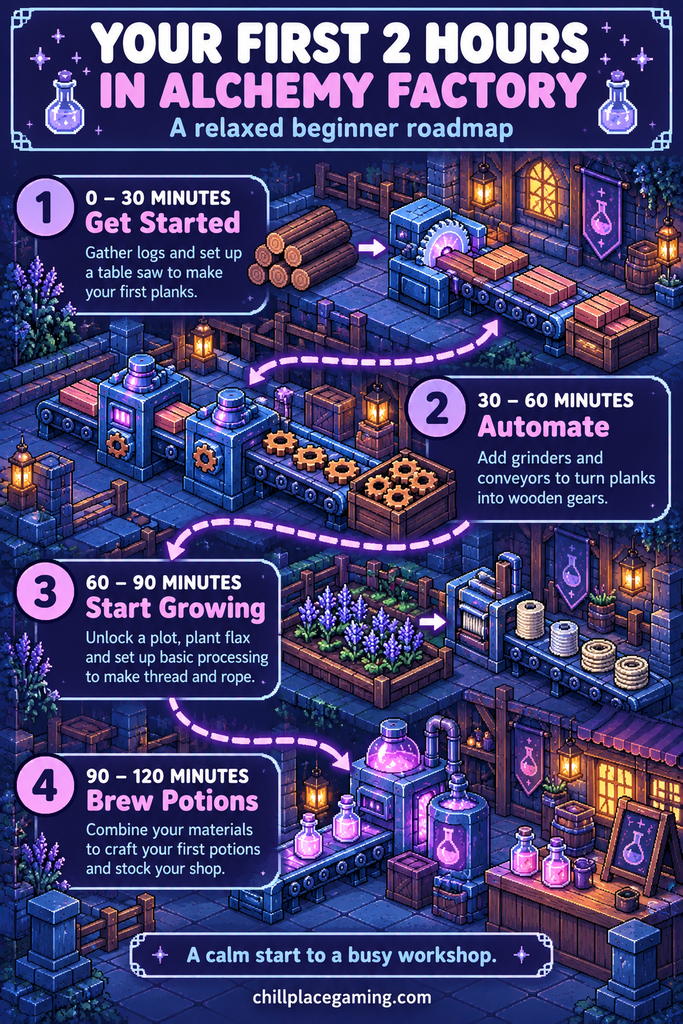
If you like a concrete plan, here is how a calm two-hour opening might look. Adjust it to your pace, and expect the order to shift a little with each patch.
In the first half hour, work through the tutorial, set up the table saw and get planks flowing. Do not worry about the shop yet beyond keeping a few items on the shelves.
In the second half hour, research grinders and your first conveyor. Build a small gear line, then deliver the early quest items and unlock the next research tier.
In the third half hour, plant your first flax and set up the thread and rope chain. This is also the time to start a small buffer chest so rope does not stall when you walk away.
In the final half hour, start on the potion line. Even a modest setup of flax, sage and two assemblers puts you on the road to the 100 Healing Potions quest.
Stop there for your first night. A clean stopping point, with machines running and the mailbox checked, makes the next session far less daunting.
🏗️ Building Up With Lifts and Floors
Land is limited, so the game nudges you towards building upwards. Conveyor lifts carry goods between floors, and stacking machines vertically shortens the belts you need.
To place a lift, set the bottom first and align it. Then hold the left mouse button and drag the top to the height you want. Hold R to rotate the top exit, then release.
The T key cycles through alternate forms of whatever you are holding. Conveyors can change direction, containers can rotate, and the basic wooden chest can become a vertical buffer or a pass-through.
Platforms and stairs, unlocked through the building tool upgrade, give you second and third floors. Leave room at the front of the build for your shop, and consider a central stairwell so you can move between floors without a long walk.
A neat trick from community guides is a central hub of lift conveyors that carries common materials, such as planks and gears, to every floor. Build that once and every floor you add can reach what it needs.
Do not rush this. Vertical building pays off once a single floor feels cramped, and not before.
📐 Blueprints: When to Start
Blueprint mode lets you save a production setup and paste it somewhere else. According to one guide, you enter it with the B key.
Do not start blueprinting on day one. In your first hour you are still learning what a good layout looks like, and a blueprint of a bad layout just spreads the problem.
A better moment is when you build the same small chain a third time. Healing potions, bandages and rope are good candidates, because you will want them again on every floor.
One Steam guide recommends keeping blueprints open and readable rather than sealing them into solid blocks. That makes them far easier to debug when something stops flowing.
You can also use other players’ work. The Steam Workshop held over 3,500 blueprints during Early Access, according to one wiki.
Treat downloaded designs as a starting point, and read them before you rely on them. Our look at the speed versus learning trade-off with blueprints applies just as well here.
⚠️ Common Beginner Mistakes
These are the slips that cost new players the most time. None of them is fatal, but each is easy to avoid once you know about it.
- Unlocking too much at once. Research one product, stock it, then move on.
- Letting the register overflow. Unpaid customers leave, so get the Automatic Cashier and a bank portal in place early.
- Ignoring the mailbox. Daily quests can pay far better than ordinary sales.
- Feeding furnaces too early. They burn fuel whether or not they are smelting.
- Skipping the ratio check. The game will not warn you, so look at the build menu first.
- Overbuilding before the core unlocks. One Steam guide cautions that building too much early slows your tech progress.
- Running the storefront at the expense of research. Selling is the point, but progress comes from unlocking.
- Sealing everything into blocks. A compact build you cannot read is a nightmare to repair.
If your base is already jammed, our guide to troubleshooting common factory problems is written for another game but the diagnostic habits carry over. Start at the point where items pile up and work backwards.
🔭 What to Expect Mid-Game
Once the shop runs itself, the game opens up. Iron ore arrives, relics enter the picture, and your shop can stock a wider range of goods.
Cauldrons appear as a way to convert several inputs into a product. One Steam guide claims their cost efficiency can swing a long way either side of normal production, so test them against your existing lines before committing.
Catapults and cannons become useful for moving goods over medium and long distances. One guide argues that large numbers of conveyors can slow the game down in the late stages, so it is worth thinking about when a launcher is the better choice.
Layout becomes the real puzzle at this stage. Our piece on factory layouts and expansion strategies is a useful companion when you start to feel cramped.
How the later transport options behave is still shifting after the 1.0 update. We will cover them in a dedicated follow-up once they settle, so check back before you plan an end-game network.
🏁 Final Thoughts
Alchemy Factory rewards patience more than speed. If you build one dependable chain, protect your income and add things in small steps, the game almost teaches itself.
Keep a loose plan for your first few sessions. Get the saw running, reach flax and rope, finish the 100 Healing Potions quest, and only then start thinking about floors and blueprints.
You will make a mess, and that is part of it. The best part of the game is the evening you look at a tidy line and remember how scrappy it started.
If you are new to this kind of game altogether, our beginner’s guide to simulation games is a gentle way to build up the skills that transfer here.


