As an Amazon Associate I earn from qualifying purchases and sometimes recommend products from other sellers at no extra cost you. For more details see my disclosure policy and privacy policy.
Every Factorio player hits the same wall eventually. Your factory works, mostly, but you cannot tell why the green circuits are starving or which assembler row is quietly doing nothing. Or the opposite problem: the factory is humming, you have launched the rocket, and the game has run out of new things to ask of you.
Those are two different problems, and they need two different kinds of mod. This roundup splits the picks that way: tools that show you how well your factory is actually running, and picks that stretch the game once vanilla has given you everything it has.
Every mod below was checked against the Factorio mod portal in early October 2026 for support of the current 2.x versions. I will also be straight about sequencing, because the most tempting mod on this list is the one you should leave until last.
🔍 Efficiency Mods: See What Your Factory Is Really Doing
Vanilla Factorio gives you production statistics, and they are useful. What they do not give you is a quick answer to “how many more machines do I need here?” or “which of these assemblers is the problem?”.
Chill Place Gaming Store
Take your game further 🎮
Reference sheets, printable guides, and gaming goodies — made by the Chill Place Gaming team to help you play smarter.
Secure checkout
powered by Shopify
The three mods in this section answer those questions in different ways. You will probably want one or two of them, not all three.
Rate Calculator: Draw a Box, Get the Maths
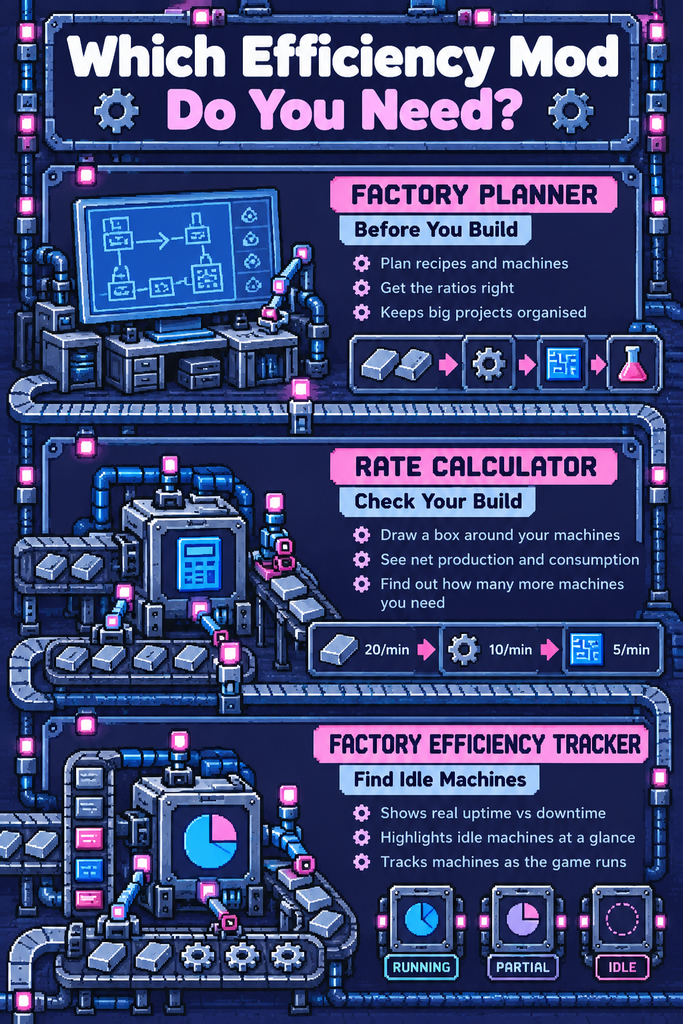
Rate Calculator is the one to install first. You select a group of machines with its tool and it shows the net production and consumption of every item in that setup, including intermediates, plus how many extra machines of the same kind you would need to cover a shortfall.
That makes it the right “ratios” mod for a mid-game player. It replaces the back-of-an-envelope sums you would otherwise do against the wiki, and it works on a build you have already made rather than one you are only planning. The portal lists support from 0.18 up to 2.1, with version 3.4.1 current at the time of writing.
One caveat matters. The numbers it shows are the maximum rates of the machines you selected, not what they are actually producing. If a belt is starved or a furnace is waiting on ore, Rate Calculator will not know. Treat its output as “what this setup could do” and you will not be misled.
Factory Planner: Work It Out Before You Build
Factory Planner covers the same job from the other direction. You tell it what you want to make and how fast, pick the recipes and machines, and it works out the whole chain for you, with subfloors so a big project stays organised.
Use it when you are about to build something large and would rather get the ratios right on the first attempt. The portal lists support up to 2.1 and describes it as compatible with Factorio 2.0 and Space Age, and it was updated only days before this post was written.
The trade-off is that planning takes time before you place a single belt. If you enjoy designing on paper first, that is a feature. If you prefer to build, look and fix, Rate Calculator will suit you better.
Factory Efficiency Tracker: Real Uptime, Not Theoretical Output
Factory Efficiency Tracker fills the gap that Rate Calculator leaves. It watches your assembling machines and furnaces as the game runs and shows uptime against downtime as colourised overlays, so the idle machines stand out at a glance.
The portal lists version 2.1.0 with support for 1.1 through 2.1, and the author says it is built to keep the performance cost low in large factories. Because it tracks machines from the moment they are built, it gives you a lifetime picture rather than a snapshot.
This is the mod for diagnosis. If your factory is underperforming and you cannot see where, it points you to the machines that are waiting.
Which One Should You Use When?
Here is the simple version of how the three fit together.
- Before you build: Factory Planner, to work out recipes, machine counts and ratios in advance.
- Checking a build you already have: Rate Calculator, to see what the setup could produce and where it is short.
- Working out why it is underperforming: Factory Efficiency Tracker, to see which machines are actually idle.
If you only add one, make it Rate Calculator. If a factory is misbehaving and you cannot find the cause, add the tracker next. For a deeper look at what usually goes wrong, our guide to troubleshooting common Factorio factory problems pairs well with it.
🚶 Quality-of-Life Mods: Small Changes, Less Friction
Not every good mod needs a tutorial. Some simply remove a small, repeated annoyance, and those are the easiest to live with over a long save.
Squeak Through 2: Stop Getting Stuck
Squeak Through 2 lets your engineer slip past entities that would normally block movement. It is billed as a more configurable and more compatible rewrite of the original Squeak Through, written from scratch, and you choose which entities become passable.
The portal lists version 0.2.0 with support from 1.1 up to 2.1, and the developer specifically recommends it for trees. If you have ever been pinned in a corner of your own factory or boxed in by a tree line while biters closed in, you already understand the appeal.
It suits a relaxed playstyle well. Nothing about the game’s rules changes, and you simply spend less time shuffling around obstacles. As with any mod, check the settings page first so you only enable what you actually want.
🚀 Space Exploration: The Big Expansion Pick
Space Exploration is the mod people mean when they say Factorio can last for hundreds of hours. I should be upfront here: I have not played it yet. It is on my list, so what follows is what the mod promises and what the portal says, not a hands-on verdict.
What It Promises
The mod page describes more than 600 locations to find, covering planets, moons and asteroid fields, with 29 science packs to work through. Progression splits into several parallel science types, and you build space stations and spaceships along the way.
The developers say it takes 50 or more hours just to reach space and that the average completion time is over 500 hours. They also describe it as an extensive overhaul that is still in experimental status, with the recommended approach being to stick to its suggested companion mods. The latest version on the portal was 0.7.62, updated within the last couple of weeks, and the 0.7 series supports Factorio 2.0.
The Space Age Question
This is the part to get right before you install anything. Space Exploration and the Space Age expansion both take over the part of the game that deals with travelling between planets, and the guidance I found says the creator did not design the mod to be played alongside Space Age.
In practice, treat it as either/or. You play the Space Age planets, or you play Space Exploration on Factorio 2.0 with Space Age switched off. I’ve just installed it to begin my long trek to space and can confirm you need to take off the Space Age DLC to get it to operate. Also there’s a mod pack that includes other mods they recommend alongside it so I installed that for simplicity.
Who It Suits
It suits players who have finished the standard campaign, enjoy long-term planning and are happy to treat a new save as a fresh project. It is a poor fit if you want a quick change of pace or if your main aim is to finish Space Age.
If you are weighing the expansion first, our look at what the latest Space Age updates mean for your space logistics covers the official side of things. You may find the Space Age planets already give you the variety you were after.
🧭 When to Add Mods (and When to Wait)
My honest advice on sequencing is to finish the standard planets before you add an overhaul. Vanilla Factorio, or vanilla plus Space Age, is a well-balanced game, and an overhaul rewrites that balance. It is much easier to appreciate what a mod changes once you know what it replaced.
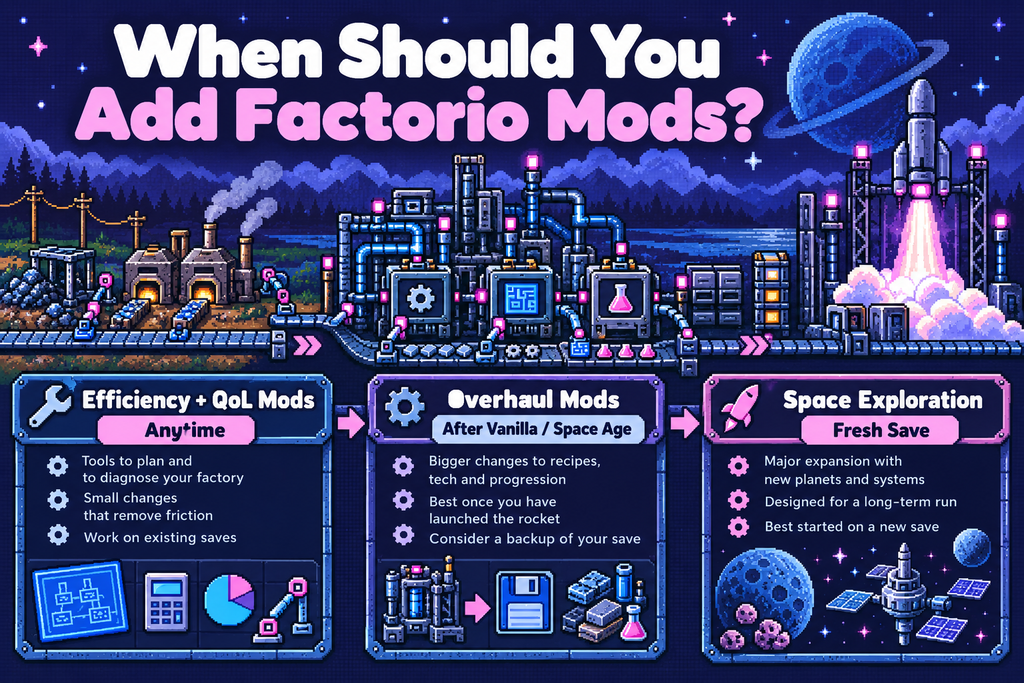
The efficiency and quality-of-life mods are different. They do not change what the game asks of you, so you can add them whenever you like.
Adding Mods to an Existing Save
Efficiency and QoL mods can usually be added to a running save without trouble, and they give you something useful straight away. Overhauls like Space Exploration are a different matter and are best started on a brand new save.
Before you add anything to a save you care about, take a manual backup copy of the save file. It takes seconds and means a bad mod costs you nothing.
A Quick Pre-Install Check
Run through this list on the mod portal page before you install any mod.
- Factorio version: Confirm the mod lists support for the version you are running. Plenty of older mods are 1.1 only and will not load on 2.x.
- Dependencies: Check what else it needs, particularly for overhauls.
- Last updated: A recent update date is a good sign that the author is still maintaining it.
- Compatibility notes: Read the description and recent discussion for conflicts with Space Age or other mods you use.
- Your save: Back it up first, and decide whether this is a mod for an existing save or a fresh start.
🛠️ Putting It Together: A Sensible Mod Setup
If you want a short, low-risk starting point, here is how I would build it up over time.
Start with Rate Calculator, because it solves the most common mid-game headache for almost no cost. Add Squeak Through 2 if movement friction bothers you. Bring in Factory Planner if you like planning big builds, and Factory Efficiency Tracker when a factory is underperforming and you want proof of where.
Leave Space Exploration until you have finished the standard campaign and have a free weekend to read its portal page properly. By then you will know whether you want a longer game, and whether you want it enough to give up the Space Age planets.
For anything beyond these picks, the usual tactics still matter more than any mod. Our guides on how to scale up a megabase, factory layouts that avoid spaghetti and science pack optimisation cover the ground that mods cannot. And if you are deciding whether to use ready-made designs, the speed versus learning trade-off of Factorio blueprints is worth a read first.
If you are still on the fence about the expansion itself, Factorio: Space Age is the DLC to look at, and it is the either/or partner to Space Exploration.
✅ The Short Version
If you want to see how your factory is really performing, start with Rate Calculator, then add Factory Planner or Factory Efficiency Tracker depending on whether you plan ahead or diagnose afterwards. If you want less friction, Squeak Through 2 is an easy yes. If you want a far longer game, Space Exploration is the ambitious pick, but it is either/or with Space Age and best saved until you have finished the standard planets.
Whatever you add, back up the save, check the portal for your Factorio version, and add one mod at a time so you know what changed.