
As an Amazon Associate I earn from qualifying purchases and sometimes recommend products from other sellers at no extra cost you. For more details see my disclosure policy and privacy policy.
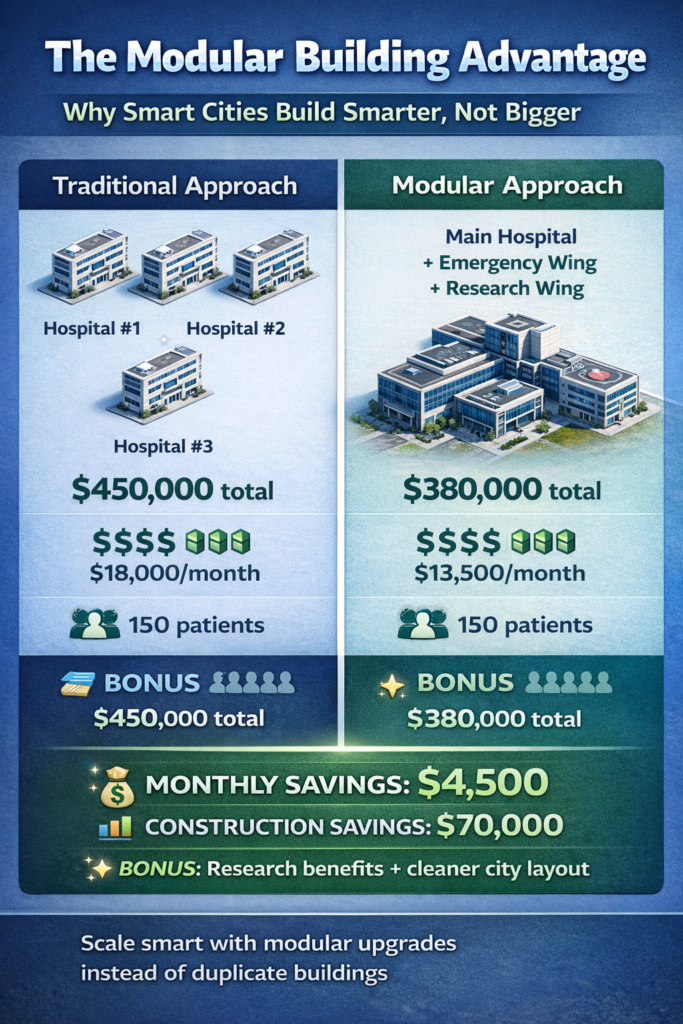
Building a thriving city in Cities: Skylines II requires understanding how to scale your services efficiently without cluttering your map with duplicate buildings. Modular building mechanics let you expand hospitals, schools, power plants, and even entire harbor complexes by adding specialized extensions instead of plopping down endless copies of the same structure.
The June 2024 update transformed these mechanics from rigid, socket-based limitations into a flexible system that actually feels creative. Let’s break down what changed, how the system works now, and practical strategies for using it to build better cities.
🎯 What Modular Buildings Actually Are
Think of your service buildings as customizable hubs rather than static structures. Many city services in Cities: Skylines II support upgrades that act as sub-buildings or extensions, letting you boost capacity, improve efficiency, or add specialized functions without building an entirely separate facility.
Common modular service examples include:
Chill Place Gaming Store
Take your game further 🎮
Reference sheets, printable guides, and gaming goodies — made by the Chill Place Gaming team to help you play smarter.
Secure checkout
powered by Shopify
- Elementary schools gain extra classrooms to handle more students
- Power plants accept additional turbines for increased generation
- Universities grow specialized research wings or library extensions
- Hospitals add emergency departments or specialized care facilities
Each extension plugs into the parent building, expanding what that single location can accomplish. This concept extends beyond basic services into infrastructure. Ports and specialized industry use modular components—cargo terminals, passenger docks, fishing facilities, industrial piers—that snap together into larger complexes.
The advantage becomes clear when you compare it to the alternative. Instead of spamming four identical elementary schools across a district, you can create one well-developed educational campus with multiple extensions that handle the same student capacity while looking more intentional and using land more efficiently.
| Service Building | Base Capacity | Common Upgrades | Strategic Choice |
|---|---|---|---|
| Elementary School | 500 students |
Classroom Wing (+300 capacity) Quality Module (+0 capacity, better education output) |
Capacity
Quality
Scale for growth vs invest in outcomes |
| Hospital | 50 patients |
Emergency Wing (+30 patients) Research Lab (+0 patients, city health bonus) |
Capacity
Quality
Immediate service vs long-term investment |
| Power Plant (Wind) | 80 MW |
Additional Turbine (+40 MW output) Efficiency Module (+0 MW, -20% operating cost) |
Capacity
Economy
Power output vs budget optimization |
| University | 800 students |
Lecture Hall (+400 capacity) Library Wing (+0 capacity, +research boost) Student Center (+200 capacity, +happiness) |
Mixed
Balance capacity, research, and citizen satisfaction |
| Cargo Port | Base terminal |
Cargo Pier (+trade capacity) Storage Facility (+buffer capacity) Rail Connection (multimodal efficiency) |
Capacity
Economy
Throughput vs logistics optimization |
| Fire Station | 10 fire engines |
Additional Bay (+5 engines) Training Facility (+0 engines, faster response) |
Capacity
Quality
Coverage area vs response effectiveness |
| Police Station | 15 patrol cars |
Vehicle Bay (+8 cars) Holding Cells (+capacity, reduces crime faster) |
Capacity
Quality
Patrol coverage vs crime reduction speed |
Strategy badges indicate upgrade focus: Capacity = more volume, Quality = better outcomes, Economy = cost savings, Mixed = balanced benefits
🔧 The June 2024 Game-Changer: Radius-Based Placement
Modular buildings launched with Cities: Skylines II, but they felt stiff and limiting. Sub-buildings had to snap directly to fixed sockets on the main building’s lot—typically the four cardinal sides. This meant your hospital extensions formed rigid boxes, your school additions lined up in predictable rows, and creative layouts were basically impossible.
Patch 1.1.5f1 in June 2024 completely reworked this system. Sub-building upgrades can now be placed freely anywhere within a defined radius around the main building instead of locked to specific attachment points. This single change opened up genuine creativity in how you design your service complexes.
The radius appears as a highlighted circle when you’re placing an upgrade. Inside that zone, you can position the sub-building wherever makes sense for your layout, rotate it to align with nearby roads or pedestrian paths, and integrate it into the surrounding urban fabric instead of treating it as a rigid add-on.
This means you can detach a university library slightly from the main building to create a courtyard between them. You can angle a hospital emergency wing toward the main arterial for better ambulance access. You can spread power plant turbines to follow terrain contours or avoid existing infrastructure.
The mechanical connection still exists—the upgrade functions as part of the parent building—but the visual and spatial relationship became far more flexible. That’s the difference between feeling like you’re playing with Lego bricks versus feeling like an actual urban planner.
🧠 Full Control Through the Selected Info Panel
The radius change came alongside major improvements to how you manage existing modular buildings. The Selected Info Panel for any service building now gives you comprehensive control over all attached upgrades.
Click any main service building and open its Selected Info Panel. From here you can:
- Add new upgrades by selecting from available options
- Remove existing upgrades without using the bulldozer
- Toggle sub-buildings on/off to disable them temporarily
- Relocate upgrades within the allowed radius for better positioning
The bulldozer still works for physical removal if that’s your preference, but the panel approach is cleaner for iterative design.
This transforms modular services from permanent decisions into something you can experiment with throughout your city’s development. Early in your game, you might add basic capacity upgrades to handle initial population growth. Mid-game, you might swap some for specialized efficiency modules as your budget tightens. Late-game, you can relocate extensions to better positions as you redesign surrounding infrastructure.
The toggle feature deserves special mention. Turning off upgrades temporarily disables them and stops their operating costs without requiring you to demolish and rebuild. If your healthcare demand drops seasonally or your power consumption decreases after efficiency improvements, you can mothball certain extensions until you need them again. This saves money while preserving the layout you worked hard to create.
⚡ How Modular Services Actually Work: Step-by-Step
Understanding the workflow makes the system feel natural rather than mysterious. Here’s how to use modular buildings effectively for city services:
Step 1: Place your main service building. Start with the core asset—an elementary school, power plant, hospital, or whatever service you need. Position it where road access and coverage make strategic sense, just like you would with any building in mastering road hierarchy.
Step 2: Open the Selected Info Panel. Click the building and examine which upgrades are available. Each upgrade shows its construction cost, ongoing operating expenses, and specific effects (capacity increase, efficiency boost, new functionality, etc.). This is where you decide what your facility actually needs versus what would be nice to have.
Step 3: Add and position your first upgrade. Choose an upgrade, and the game highlights the placement radius around your main building. Place the sub-building anywhere in that zone. Rotate it to fit your road grid, leave room for pedestrian paths, create visual interest by offsetting it slightly—the flexibility is yours.
Step 4: Iterate as your city evolves. Return to the Selected Info Panel whenever your needs change. Swap inefficient upgrades for better options as they unlock. Relocate extensions that ended up in awkward positions. Toggle off modules during budget crunches. Add capacity when demand spikes.
Here’s a concrete example. You build an elementary school in a new residential district. Population grows, and you add a classroom extension to handle more students. You place it offset from the main building with a pedestrian path connecting them, creating a mini-campus feel. Later, that district matures and your school fills up again. Instead of building a second school, you add another classroom wing on the opposite side. Now you have an educational complex that serves the entire neighborhood from a single location with better coverage than two separate schools would provide.
🚢 Modular Ports: Building Maritime Complexes
The modular concept extends beautifully into harbor development, where it actually makes more sense than it does for basic services. Real ports aren’t single buildings—they’re sprawling complexes of specialized terminals, and Cities: Skylines II models this accurately.
Start with a core port facility placed on suitable coastline with good road and rail access if possible. From there, you add function-specific modules: cargo piers for trade, passenger terminals for tourism, fishing facilities for resource extraction, or industrial piers for specialized production.
The key difference from service buildings is scale and interconnection. You’re not just adding one or two upgrades—you’re building an entire harbor district module by module. Use quays and breakwaters to shape realistic basins, then slot terminals and piers along the waterfront. Each module connects to your road network independently while still functioning as part of the larger port complex.
As your city’s economy grows, you extend the harbor with more specialized terminals instead of building completely separate ports along the coast. A modest cargo terminal evolves into a major trade hub with multiple piers. A fishing village expands into a mixed-use harbor handling both resources and passenger ferries. The modular approach scales with your city’s development in ways that feel organic rather than artificial.
⚠️ Design Strategies That Actually Work
The mechanical flexibility opens up strategic possibilities that weren’t viable under the old socket system. Here are approaches that make the most of radius-based placement:
Specialize instead of just scaling. Don’t default to adding raw capacity upgrades every time. Consider these strategic choices:
- Education quality modules improve learning outcomes rather than just cramming in more students
- Healthcare facilities can add research wings for long-term city benefits instead of just more beds
- Power plants can gain efficiency turbines that reduce fuel costs alongside capacity increases
Mix your upgrade choices based on what your city actually needs at that moment.
Create intentional layouts with the radius freedom. Position sub-buildings to form courtyards, plazas, or parking areas between them and the main facility. Connect everything with pedestrian paths so the complex feels cohesive rather than scattered. A hospital with its emergency wing offset toward the main road, research facility angled toward the university district, and administrative building tucked behind creates visual interest while serving functional purposes.
Think about traffic impact for each module. Every extension you add generates its own visitors, deliveries, or service vehicles. Just like you learned when understanding industry areas, arrange service roads or dedicated access routes for busy extensions so they don’t jam your main arterials.
Key traffic considerations:
- Emergency wings should connect directly to primary routes
- Classroom extensions can use quieter residential streets
- Cargo terminals need dedicated access to prevent bottlenecks
Use budget toggles for economic flexibility. Modular buildings create natural opportunities for cost management. Turn off certain upgrades during low-demand periods—extra school wings during summer, overflow hospital capacity during healthy seasons, supplementary power generation when consumption drops. This shaves operating costs without deleting infrastructure you’ll need again later.
Iterate with relocation instead of demolition. Since sub-buildings can now move within their radius, treat layouts as evolving designs rather than permanent fixtures. Slide modules closer to transit connections, away from noise-sensitive zones, or into cleaner geometry as you upgrade surrounding roads. Small adjustments accumulate into significantly better functionality over time.
🔄 What This Means for Returning Players
If you played Cities: Skylines 1, modular buildings will feel both familiar and different. The original game had area-based mechanics for Industries and Campus where you defined districts and built specialized structures within them. Cities: Skylines II partially merged those concepts but applies them per-building rather than per-district.
The early version of CS2’s modular system felt more restrictive than CS1’s hand-placed sub-buildings, which frustrated veterans who remembered the freedom of park areas and campus customization. The June 2024 radius update addressed most of those concerns, though some players still note that full SimCity 2013-style freedom—multiple copies of the same module, completely detached placement—remains out of reach.
The trade-off makes sense from a design perspective. Per-building modularity keeps expansion focused and prevents the visual clutter that unlimited module placement can create. It’s a different philosophy rather than a strict downgrade, and once you internalize the radius system, it feels appropriately balanced.
🎮 Putting Modular Mechanics Into Practice
Modular buildings work best when you think about them from the start of your city planning rather than as afterthoughts. When you’re laying out a new district in your first city, reserve slightly larger plots for key service buildings that you know will need expansion. This prevents having to demolish surrounding structures later when you want to add wings or extensions.
Monitor your Production and City Services tabs to identify which facilities are hitting capacity limits. Adding a targeted upgrade to an existing building often solves the problem more cost-effectively than building an entirely new facility across town.
Practical implementation tips:
- Budget management: Three upgraded hospitals cost less in operating expenses than six standalone ones
- Capacity monitoring: Watch your service tabs for facilities approaching maximum load
- Expansion planning: Reserve extra space around service buildings during initial placement
- Iterative improvement: Adjust layouts as your city evolves rather than rebuilding from scratch
Pay attention to how different games in the Cities: Skylines series compare in terms of asset variety. While CS2’s modular system is more sophisticated mechanically, the asset library is still growing compared to the mature mod ecosystem of the original. This means your modular designs might feel more uniform until community creators expand the available options.
The most efficient cities aren’t the ones with the most buildings—they’re the ones where each building does exactly what it needs to do through smart use of upgrades and extensions. Build your service infrastructure with modularity in mind from day one, and you’ll create cities that scale gracefully instead of sprawling chaotically.
Understanding modular mechanics transforms how you approach city services in Cities: Skylines II. The June 2024 improvements gave you real creative freedom to design campuses, harbor complexes, and service centers that feel intentional rather than accidental. Start thinking in terms of expandable hubs rather than static buildings, and your cities will function more efficiently while looking far more interesting.
Stop Fighting Traffic.
Start Designing It.
Get the CS2 Road & Junction Toolkit, 11 decision tools for diagnosing jams, picking the right junction, and fixing your city's traffic for good.
- ✓Road hierarchy rules and the 5 mistakes that break them
- ✓A junction selection cheat sheet and a diagnostic flowchart
- ✓A full worked example, before and after


