
As an Amazon Associate I earn from qualifying purchases and sometimes recommend products from other sellers at no extra cost you. For more details see my disclosure policy and privacy policy.
Prepare to embark on an unparalleled gaming adventure with PlayStation VR, where the boundary between reality and the virtual world blurs into an exhilarating experience. PlayStation VR opens a portal to extraordinary realms filled with vivid detail and heart-pounding action, inviting players to step into the game and become the heroes of their own epic stories. Get ready to unlock a new dimension of gaming where your senses will be captivated, and every move matters.
Introduction to Virtual Reality
Virtual Reality (VR) technology thrusts users into an immersive digital landscape, generating a full 360-degree panorama of interactive environments. By donning a VR headset, individuals can explore a three-dimensional space, manipulate items, and perceive a simulated world as if it were actually surrounding them.
Gaming has long been a frontier for VR’s growth. From its rudimentary beginnings with simplistic graphics and limited interactivity, VR gaming has blossomed into a sophisticated medium. Advances in computer graphics, motion tracking, and spatial audio have significantly elevated the realism and responsiveness, offering gamers an increasingly vivid and believable experience that previously lived only in the realm of science fiction.
Unboxing the PlayStation VR
Unveiling the PlayStation VR is the first step toward diving into the enthralling world of virtual reality. The box contains all the necessary components to begin your journey. Upon opening, you will find:
Chill Place Gaming Store
Take your game further 🎮
Reference sheets, printable guides, and gaming goodies — made by the Chill Place Gaming team to help you play smarter.
Secure checkout
powered by Shopify
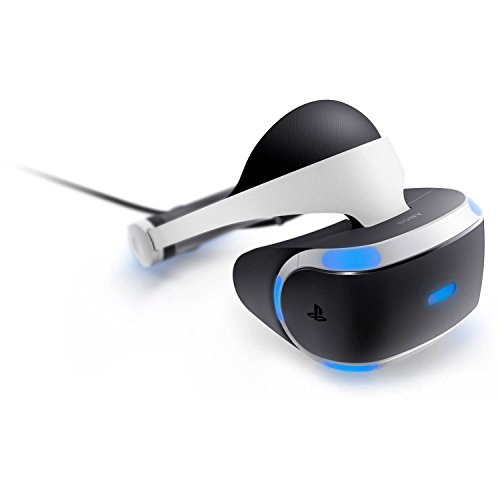
- PlayStation VR headset: The core of your VR experience, featuring a high-resolution OLED display and built-in headphones for a truly immersive audio-visual encounter.
- Processor unit: A small box that works alongside the PS4 console, processing the VR content and outputting to the headset and TV.
- HDMI cable: Facilitates the connection between your PS4 and the processing unit for video transmission.
- USB cable: Provides the connection between the processing unit and the PS4, enabling data transfer.
- AC power adapter and cord: Supplies power to the processing unit.
- PlayStation VR headset connection cable: Connects the headset to the processing unit to combine the visual and audio output.
- Earbuds: For a personal audio experience that complements the 3D sound in VR.
- PS VR Demo Disc: Offers a selection of games so you can start playing right away.
- User documentation: Includes setup guide, safety information, and warranty details.
Required Additional Hardware
To fully enjoy your PlayStation VR experience, there are a few additional pieces of hardware you will need:
- PlayStation Camera: Required for motion tracking of the headset and PlayStation Move controllers.
- PlayStation console: The gaming platform for running VR games and the backbone of your PlayStation VR experience.
- PlayStation Move controllers (optional, but recommended): Enhance interaction in the VR space with precise motion controls.
- Adequate play space: Ensure you have enough room to move around safely without any obstructions.
Setting up your PS VR involves connecting these components, calibrating your system, and stepping into the world of immersive gaming.
Setting Up Your PlayStation VR
Setting up the PlayStation VR may seem daunting at first, but by following these step-by-step instructions, you’ll be immersed in virtual worlds in no time. Here’s how to get started:
- Connect the PlayStation Camera to your PS4: Position the camera on a stable and elevated surface, ideally about 4.5 to 6 feet off the ground and facing where you’ll be gaming.
- Connect the Processor Unit to the PS4: Use the HDMI cable to link the PS4 to the Processor Unit’s HDMI TV port. Then, connect the Processor Unit’s HDMI PS4 port to the PS4 using a second HDMI cable.
- Plug in the Processor Unit: Attach the AC power adapter to the Processor Unit and plug it into an electrical outlet.
- Connect the PlayStation VR headset: Using the VR headset connection cable, hook up the headset to the front of the Processor Unit.
- Power on each device: First, turn on your TV, followed by the PS4, and then the PlayStation VR headset. Follow the on-screen instructions for further setup and calibration.
- Adjust the PlayStation Camera: The camera needs to clearly see your headset and any motion controllers you’re using, so you may need to make further adjustments.
Tips for Optimal Placement and Room Preparation
- Ample Space: Clear the area to create a play space of approximately 10 feet by 10 feet. This will ensure you have sufficient room to move freely without the risk of tripping or hitting nearby objects.
- Lighting Conditions: Avoid direct sunlight on the camera or headset to prevent tracking issues. Use blinds or curtains if necessary and maintain even lighting in the room to reduce interference.
- Furniture Layout: If possible, have a seat within easy reach. Some experiences are best enjoyed while seated, and having a chair without armrests or a couch provides versatility for different types of games.
- Camera Positioning: The camera should have a full view of all the space you’re planning to use. Test different camera angles to find the one that provides the best tracking for your play space.
- Cable Management: Use cable ties or clips to keep cables out of your play space to avoid getting tangled or tripping over them during gameplay.
Remember, it’s crucial to ensure that everything is properly set up and calibrated before you dive into your first game to enjoy a smooth and immersive virtual reality experience with your PlayStation VR.
Exploring the PlayStation VR Library
Once your PlayStation VR setup is complete, you’re ready to explore the expansive PS VR game library. Here are some top-rated games that have captivated players’ imaginations:
- Astro Bot Rescue Mission: An adventurous platformer that utilizes VR to reinvent the genre.
- Resident Evil 7: Biohazard: A chilling horror experience that puts you in the center of the nightmare.
- Beat Saber: A rhythm game that has you slashing beats of adrenaline-pumping music.
- Skyrim VR: The world of Tamriel comes to life in an incredibly immersive way.
- Blood & Truth: Dive into the London underground in this heart-pounding action thriller.

The PS VR library covers a wide variety of genres, ensuring that there’s something for everyone:
- Action/Adventure: For those who crave adrenaline and exploration in fantastical settings.
- Horror: To immerse yourself in spine-tingling frights and jump scares that feel all too real.
- Puzzle: Where you can challenge your mind with intricate problems and spatial conundrums.
- Simulation: Offering experiences that range from flying high in the sky to deep sea exploration.
- Education/Experience: Learn or simply enjoy an encounter, like a virtual trip through space or historical events.
There are games perfect for quick sessions as well as deep, story-driven adventures meant for longer playtimes. With regular updates and new releases, the PlayStation VR game library continues to grow, offering fresh and exciting VR content to experience.
The PlayStation VR Experience
Immersion and Interactivity in Gameplay
One of the most compelling aspects of the PlayStation VR experience is the level of immersion and interactivity it offers. When you don the headset and enter a game, the real world fades away, replaced by a 360-degree virtual environment that responds to your movements and actions.
Whether you’re reaching out to grab objects with the PlayStation Move controllers or looking around corners in a tense stealth mission, the PS VR’s responsive tracking system makes every movement count, intensifying the sense of presence within the game world.
Social and Multiplayer Aspects
The PS VR also expands the social aspects of gaming. Through multiplayer VR titles, players can connect and collaborate or compete in a shared virtual space, as if they were truly together. You can communicate with gestures and voice, adding a new layer to in-game strategy and camaraderie.
For local multiplayer, titles like “Keep Talking and Nobody Explodes” turn the VR headset into a unique party experience where players outside of VR work with the headset wearer to defuse a bomb. Additionally, PS VR’s cinematic mode allows friends to watch as you play, projecting the game onto a virtual screen in their own headsets or on the TV screen, bringing everyone into the heart of the action.
Health and Safety in VR Gaming
Best Practices for Comfortable Play
Maintaining comfort while gaming is essential for a safe and enjoyable PlayStation VR experience. To prevent discomfort or motion sickness, start with shorter play sessions and gradually increase time spent in VR as you acclimate. Always take breaks if you start to feel fatigued or disoriented.
It is also recommended to adjust the headset properly to fit your head, ensuring that the display is clear and the unit is secure but not overly tight. In addition, recalibrate your system periodically to maintain optimal performance and tracking accuracy. Ensuring that the VR headset lenses are clean can also improve visual clarity and reduce eye strain.
Addressing Common Concerns and How to Mitigate Them
A common concern among VR users is the potential for experiencing motion sickness. To mitigate this, select games that match your comfort level and use the comfort settings provided, such as reduced movement speed or teleportation movement options. Games with smooth locomotion or rapid directional changes can be more challenging for those prone to motion sickness, so it’s best to progress to these types of games as your tolerance develops.
For those who wear glasses, the PlayStation VR headset is designed to accommodate most frames, but be cautious of potential scratching. Make sure there is a comfortable clearance between your glasses and the VR lenses.
Finally, ensure that your play area is free of obstacles and that you are aware of your boundaries in the physical space to prevent accidents. Using a chair with a swivel can help maintain orientation and provide stability during intense gaming moments. Remember that safety in VR is about understanding and respecting both the virtual and physical environments in which you’re playing.
Future of PlayStation VR
Upcoming Titles to Look Out For
The future of PlayStation VR shines bright with a lineup of eagerly awaited titles that are set to elevate the gaming experience even further. Alongside updates and expansions to existing games, new IPs and sequels from established franchises are on the horizon. Gamers can anticipate titles that push the boundaries of VR storytelling, graphical fidelity, and interactive gameplay. Some of the most anticipated releases include the follow-ups to successful games as well as new ventures that promise to harness the full potential of VR technology.
The Road Ahead for PlayStation VR Technology
As we look to the future, advancements in PlayStation VR technology continue at an impressive pace. Sony has already begun to hint at hardware improvements to offer even more immersive and high-fidelity experiences. This includes better resolution displays, more accurate motion tracking, and enhanced connectivity options that could minimize wires or even lead to wireless VR gaming. In addition, haptic feedback technology is expected to progress, potentially allowing for more tactile and engaging gameplay.
On the software front, there’s anticipation for AI-based interactions, deeper social-connectivity features, and broader applications beyond gaming, like education and professional training. The evolution of PlayStation VR holds the promise of transforming the virtual landscape and bringing us closer to a future where the line between game and reality is beautifully blurred.
Conclusion
In sum, the PlayStation VR system has redefined the gaming landscape by offering unparalleled immersion and interactivity. It is a gateway to new worlds, expanding the limits of imagination and enabling experiences that were once thought impossible. Designed for a wide range of gamers, from those seeking quick arcade thrills to those delving into deep narrative adventures, PS VR delivers a spectrum of content to captivate and engage. The social and multiplayer features bring friends and family into the game, creating memorable shared experiences.
While prioritizing comfort and safety, PlayStation VR also continuously evolves, promising a future rich with technological advancements and captivating content. As we look forward, it’s clear that PlayStation VR not only changes how we play but also expands the very definition of gaming, marking an exciting chapter in interactive entertainment.

