
As an Amazon Associate I earn from qualifying purchases and sometimes recommend products from other sellers at no extra cost you. For more details see my disclosure policy and privacy policy.
The Cities: Skylines II community got a surprise treat this week with the free Netherlands Region Pack. This massive update brings authentic Dutch architecture and urban design to your cities, complete with 428+ new assets that capture everything from historic Amsterdam row homes to innovative service buildings. What makes this pack special isn’t just the size—it’s the thoughtful design that makes these assets incredibly easy to work with.
What’s in the Pack
The Netherlands Region Pack weighs in at 1.6 GB and includes contributions from veteran community modders Vinebold, Jez, Grunny, and Revo. These creators have a proven track record across both Cities: Skylines games and previous region packs. That experience shows in every asset.
What You’re Getting:
- Five residential zoning categories (from suburban homes to dense apartments)
- Twenty city service buildings with innovative features
- Numerous props including lights, garage doors, and working clocks
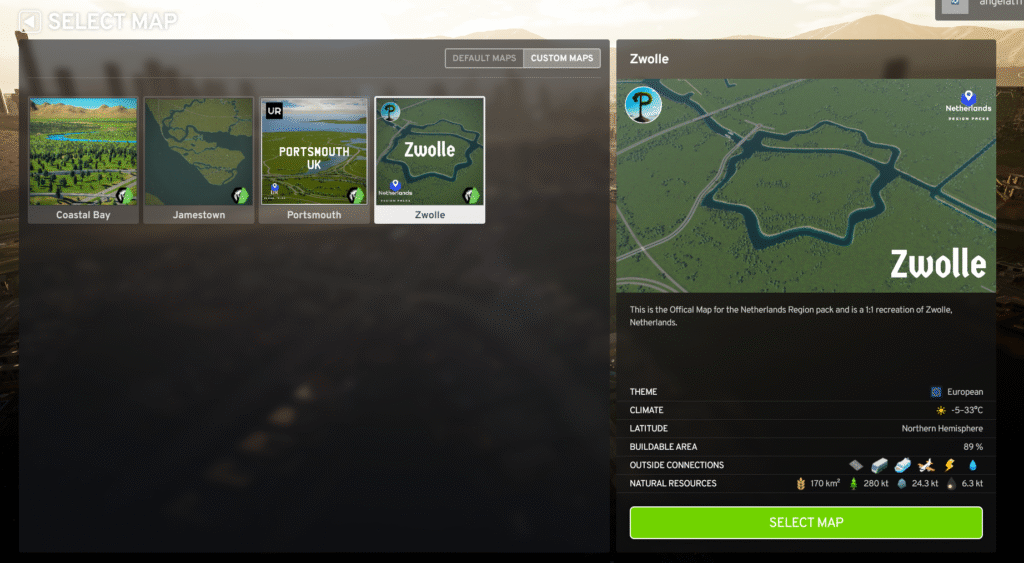
- One complete custom map (Zwolle) designed specifically for the pack
- Over 428 individual assets total
| Category | Content | Key Features |
|---|---|---|
| Residential Zones | 5 zoning categories • Low-Density Gambrel-Roof • Low-Density Gable-Roof • Medium-Density Row Homes • Medium-Density Apartments • Low Rent Housing |
Standardized 2-3 unit depths, extensive corner pieces, bike-ready infrastructure |
| Service Buildings | 20 unique buildings Healthcare, education, fire, police, post offices, transportation, utilities |
Modular cemetery system, dual-purpose substation, expandable schools and hospitals |
| Props & Details | Landscaping elements, lights, garage doors, working clocks, bike racks | Modder-accessible additional props including fluorescent lights |
| Custom Map | Zwolle, Netherlands 1:1 recreation by Ponderosa |
Pre-built canals, custom tile boundaries, perfect station placement |
| Total Assets | 428+ individual pieces | 1.6 GB download size |
| Creators | Vinebold, Jez, Grunny, Revo | Veteran modders with Cities: Skylines 1 & 2 experience |
The pack stands out for its consistent sizing and organization. Most residential assets are either two or three units deep, which means you can plan your blocks predictably and mix different building types without awkward gaps or misalignments.
Chill Place Gaming Store
Take your game further 🎮
Reference sheets, printable guides, and gaming goodies — made by the Chill Place Gaming team to help you play smarter.
Secure checkout
powered by Shopify
This standardization isn’t limiting—it’s liberating. When you know your blocks need to be four or six units deep, you can focus on creative layouts instead of puzzle-solving every placement. The corner pieces deserve special mention here. Unlike many vanilla buildings that leave blank walls when blocks end, these assets include dedicated corner pieces that complete your streetscapes naturally.
Residential Buildings That Actually Work Together
The pack offers housing options from suburban single-family homes to dense urban apartments. Each category has its own character while maintaining compatibility with the others.
Low-Density Housing Options
The Gambrel-Roof Housing gives you classic Dutch suburban homes with distinctive roof shapes. These one-unit-wide buildings come in two or three-unit depths. What makes them stand out is the progression system. Level one buildings look basic, but by level five you’ll see dormers, skylights, and upgraded finishes that suggest growing household wealth.
Key Features:
- Bike racks included on every building (ready for future bike mechanics)
- Excellent corner pieces with side entrances and windows
- Natural leveling progression from simple to ornate
- Two or three unit depths for flexible planning
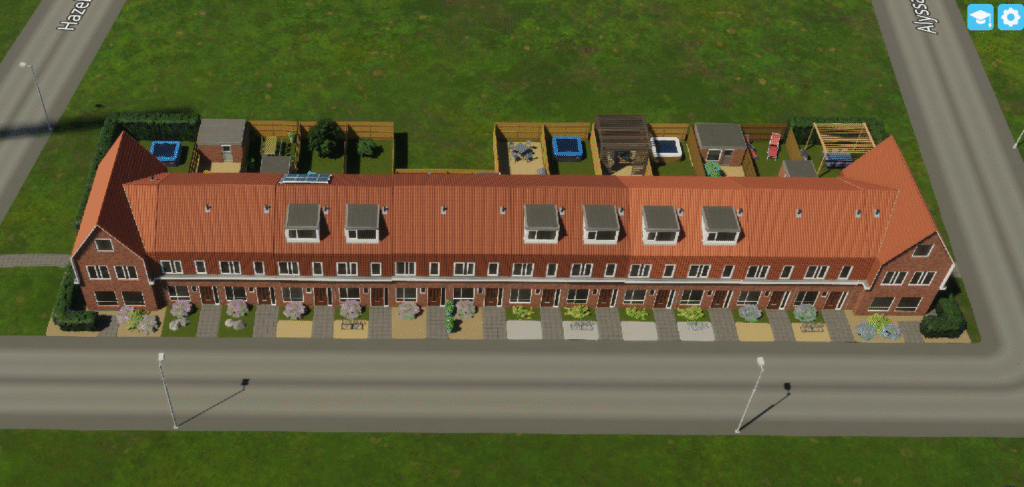
The Gable-Roof Housing takes a slightly different approach. These buildings have windows on their sides, which means they don’t technically need corner pieces. The backyards show more variation than the Gambrel style, and you can mix these with Gambrel corners if you want—they don’t align perfectly, but they look natural enough together.
Medium-Density Row Homes
These are the pack’s showstoppers. The medium-density row homes capture historic Amsterdam architecture with detailed facades, varied rooflines, and that classic Dutch brick work. There’s substantial variety within consistent dimensions, so your blocks will feel organic even when using the same lot depths throughout.
What Makes Them Special:
- Extensive variety without sacrificing consistency
- Exceptional corner pieces that wrap naturally around intersections
- Large rear windows allowing for courtyard or tight urban block configurations
- Level progression from simple to highly ornate designs
- Consistent 1-meter setbacks for easy planning
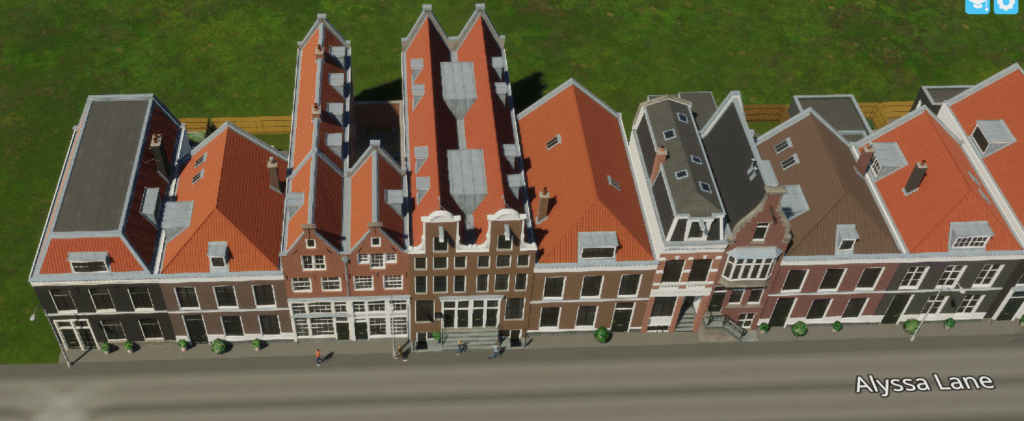
These buildings can back onto courtyards or create tight urban blocks depending on your preference. The large windows on the rear make both approaches work. Most don’t include bike parking, which means you’ll need to plan for that separately—but this creates interesting urban planning challenges rather than limitations.
Compare these to the vanilla European row homes and there’s no contest. The Netherlands assets offer dramatically more variety within the same lot depths, they include proper corner pieces, and they maintain consistent setbacks that make planning straightforward. With vanilla assets, you need varying lot depths to get visual diversity. With these, you get that diversity automatically.
Medium-Density Apartments
The 1920s-era Amsterdam apartments bring urban density with style. These assets range from one-unit-wide row home replacements to three-unit-wide apartment blocks. The three-by-three corner pieces are the real winners here—you get numerous variations, so every block corner can look unique.
The detailing strikes a good balance. These buildings look weathered and historic without seeming out of place next to modern assets. The variety in corner pieces means you can build entire neighborhoods where no two intersections look identical. That’s the kind of organic variation that makes cities feel lived-in.
Low Rent Housing
Don’t let the name fool you. These buildings are some of the most versatile in the pack. They work as standalone apartments, can combine into larger complexes, and don’t stick out when mixed into other neighborhoods. The five-by-two buildings divided by paths are particularly clever—they give the appearance of connected blocks even though they’re single assets.
Most include bike racks and feature window placements that work whether you use corner pieces or not. You could realistically use these as the foundation for custom apartment complexes or scatter them through mixed neighborhoods. They’re proving to be the most adaptable assets in the entire pack.
Service Buildings That Solve Real Problems
The service buildings here aren’t just cosmetic alternatives. Many include innovations that address actual gameplay challenges. Understanding city services in Cities: Skylines II becomes even more interesting with these options.
The Substation That Does More
This small substation matches vanilla capacity while costing half as much in both construction and upkeep. The real innovation is the fiber optics box upgrade that turns it into a communications building. You get power and internet from the same compact footprint. The upgrade attaches to the back, so the building barely grows.
Every city needs substations, and this version makes them disappear into neighborhoods rather than dominating entire blocks. The working clock face is a nice touch that adds life to the streetscape.
The Modular Cemetery System
This deserves its own section because it hints at future DLC possibilities. The base cemetery asset has lower capacity than vanilla but takes up less space. What makes it special are the upgrade options.
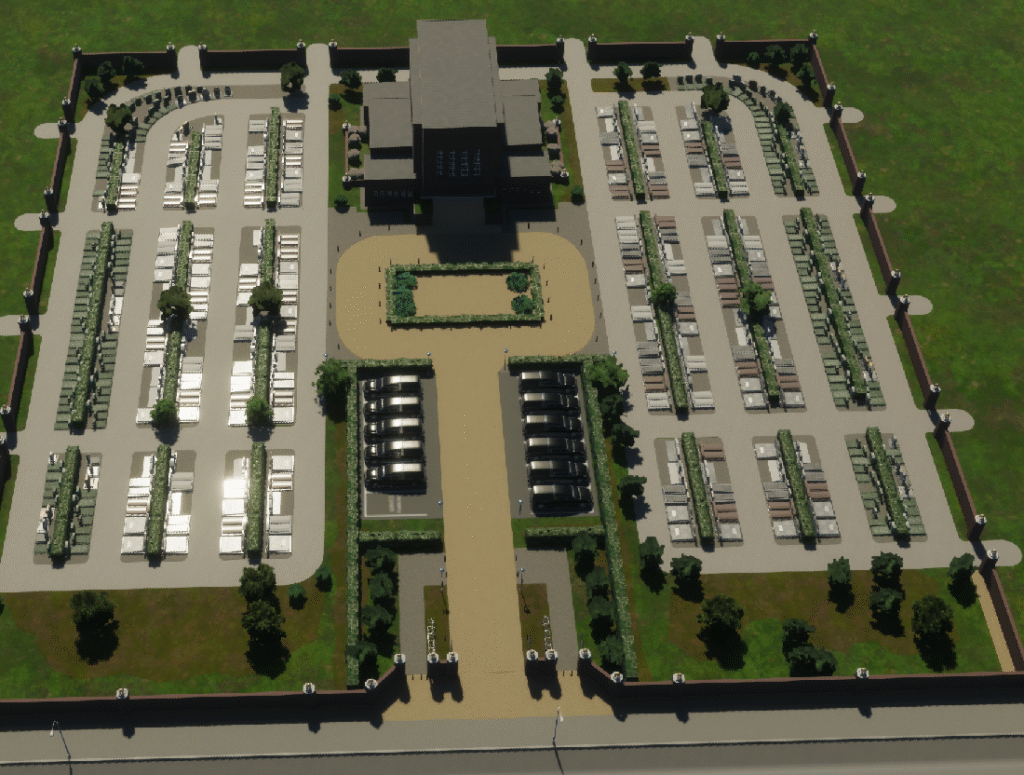
You can add crematorium buildings, additional hearse garages, memorial gardens, and various capacity expansions. These pieces connect via pathways you create, letting you design cemeteries that fit your available space and aesthetic vision. One upgrade is actually a unique building—a special memorial that can only be placed once per city.
This modular approach could be the template for future park systems or campus DLCs. The flexibility it provides makes cemetery placement a creative challenge rather than a space-filling task.
Healthcare and Education
The medical clinic matches vanilla capacity but with only one ambulance instead of three. The hospital starts cheaper than any other hospital in the game and expands through wing additions. You can add a cardiology annex for more capacity, and everything builds naturally onto the main structure.
Schools follow similar logic. The elementary school grows from a compact building into a wall-to-wall asset when you add the extension wing. The high school is one of the tallest assets in the pack and can get even taller with the chemistry lab addition. These buildings help define your skyline while serving functional purposes.
The college doubles as church architecture if you need that flexibility. The university brings modernist design that contrasts nicely with the historic buildings, and its upgrades improve graduation speed alongside capacity.
Fire, Police, and Infrastructure
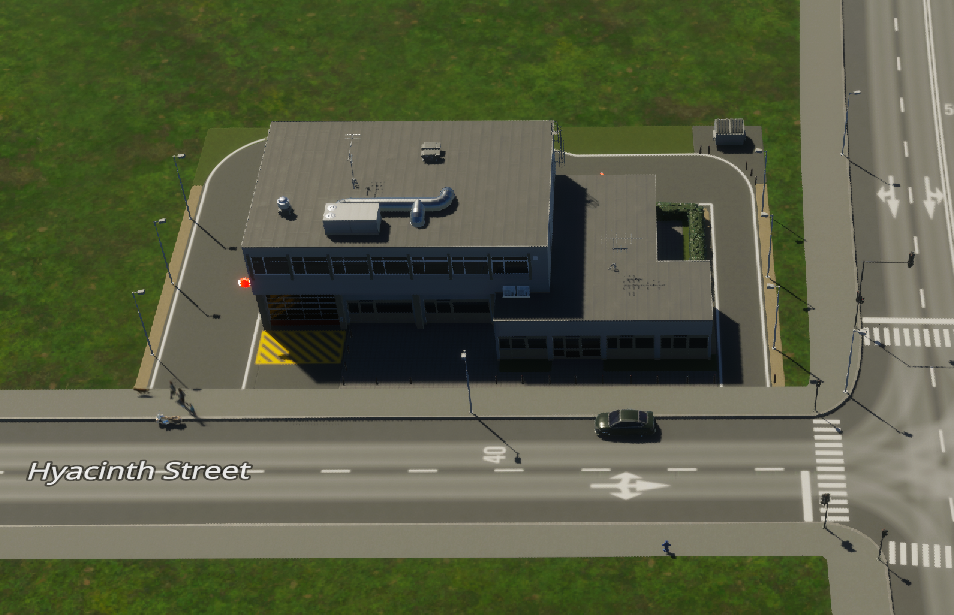
The fire station costs less than most large stations while offering solid capacity. Upgrades add vehicle bays and a helipad, all within the original footprint. The police station expands similarly—investigations unit on top, administrative wing in back.
The post offices deserve special attention. The small version fits into tight urban spaces with parking hidden in the rear garage. The historic post office is stunning, and when you add the museum upgrade to the back, it becomes a four-sided architectural showpiece that works as a neighborhood centerpiece.
The train station features working clocks, six train platforms, and seven bus platforms. It’s designed to fit perfectly on the official map, but it works in any city that needs a mid-century modern transit hub.
Parking That Hides
The three parking garage sizes (small, medium, large) look like apartment buildings from the street. The sides reveal their purpose with visible parking levels, but the front facades blend seamlessly with residential buildings. You can hide massive parking capacity in the middle of blocks, creating the dense urban environments where parking usually breaks the aesthetic.
The medium garage costs less than the vanilla multi-level parking with identical capacity. None have upgrades, but they don’t need them—the ability to make parking disappear into neighborhood fabric is the upgrade.
The Official Zwolle Map
Community mapper Ponderosa created a one-to-one recreation of Zwolle, Netherlands, for this pack. The attention to detail extends beyond terrain.
Map Features:
- Custom map tiles following natural boundaries and tree lines
- Pre-built canal infrastructure throughout
- Train station placement designed specifically for the pack’s new station asset
- Resource distribution balanced for normal difficulty play
- All four seasons in temperate climate
- Power, water, and sewer connections positioned logically in starting tile
- Hidden Easter eggs scattered throughout for exploration
The train station integration deserves special mention. Delete three track segments, place the station, add three connecting pieces, and you’re done. It fits perfectly because Ponderosa designed the map with this asset in mind.
This map serves as both a testing ground for the new assets and a practical example of Dutch-inspired urban planning. The flat terrain and canal system create natural challenges that make you think differently about city layouts.
Building with the Netherlands Pack: Practical Tips
Getting the most from these assets requires understanding their strengths. The road hierarchy system becomes even more important when working with standardized building depths.
Block Planning Fundamentals:
- Maintain four-unit or six-unit deep blocks to accommodate all residential assets
- This consistency makes redevelopment natural without creating awkward gaps
- Mixed residential types work well on the same block because depths match
- Standardized sizing lets you focus on creative layouts instead of puzzle-solving
Corner Piece Strategy:
- Use corner pieces liberally to complete intersections
- The variety means you can avoid repetition even in large developments
- Corner pieces create visual continuity that makes neighborhoods feel planned
- They solve the blank wall problem that plagues many vanilla buildings
Service Building Integration:
- Compact service buildings fit into neighborhoods rather than requiring dedicated zones
- Place the substation with fiber optics directly in residential areas
- Use the discrete crematorium anywhere—it doesn’t look like a death care facility
- Wall-to-wall school additions create seamless educational campuses within existing blocks
Cemetery Creativity:
- Create linear memorial gardens along waterways
- Build compact urban cemeteries in odd-shaped parcels
- Design sprawling memorial parks with modular additions
- The flexibility rewards creative thinking and custom layouts
Understanding the progression system helps you plan when cemetery upgrades and other additions become available as your city grows.
Recoloring Success:
- These assets recolor better than almost anything else in the game
- Within each zoning category, colors apply consistently to roofs, walls, and accents
- You can adapt these buildings to non-Dutch themes while maintaining quality
- Test a few buildings to predict how entire neighborhoods will look
Night Lighting Considerations:
- Varied window illumination makes neighborhoods feel alive after dark
- Architectural lighting on key buildings creates natural focal points
- Consider evening appearance when planning prominent building placements
- Working clocks on stations and substations add functional beauty
Visual Excellence and Technical Quality
The attention to detail extends to every aspect of these assets. Brick work, decorative elements, and material choices all feel authentic. The working clocks on the train station and substation match in-game time. The night lighting creates atmosphere without overwhelming.
Recoloring works exceptionally well across all asset types. The police station is the only service building that doesn’t recolor, but everything else responds consistently. Within residential categories, you can predict how colors will apply based on a few test buildings.
The bike rack integration throughout residential buildings shows forward planning. When bikes eventually arrive, these neighborhoods will be ready. The careful attention to architectural accuracy, from window placement to roof styles, gives these buildings credibility that survives close inspection.
What This Pack Means for Cities: Skylines II
The modular cemetery system points toward future DLC possibilities. Imagine park systems where you place a central hub and customize it with specific attractions, or campus buildings that grow through connected additions. The unique building as an upgrade option opens interesting progression mechanics.
The quality bar set here influences player expectations for future content. The standardized sizing makes building easier without sacrificing variety. The corner piece emphasis solves a long-standing vanilla building weakness. These innovations will likely influence how future region packs and official content are designed.
Community modder collaboration proves its value again. These creators understand what players need because they’ve been building cities themselves for years. The 30-page developer diary by Revo goes deep into the architectural history behind these choices.
Getting Started with the Netherlands Pack
Installing the pack is straightforward. Head to Paradox Mods either through your browser or in-game. Find the Netherlands pack from the Cities Skylines official publisher. Add it to your playsets, and the 1.6 GB download begins immediately.
Once installed, you’ll find new zoning options alongside vanilla categories and all service buildings organized in their respective menus. The props appear under landscaping and parks with a Netherlands category marker. If you’re starting fresh, the official Zwolle map makes an excellent testing ground.
The pack works well mixed with existing cities or as the foundation for a new Dutch-themed build. The recoloring flexibility means these assets adapt to various styles beyond purely Netherlands-inspired cities. Whether you’re starting your first city or expanding an existing metropolis, these assets provide tools that solve problems while looking great.
The Netherlands Region Pack represents some of the best free content Cities: Skylines II has received. The quality, variety, and thoughtful design make this essential for anyone serious about city building. Download it, experiment with the modular systems, and see how these assets change your approach to urban planning.
Get more strategy tips every week
Join readers who get our weekly roundup covering Cities: Skylines II, Factorio, Civ VII, and more.


